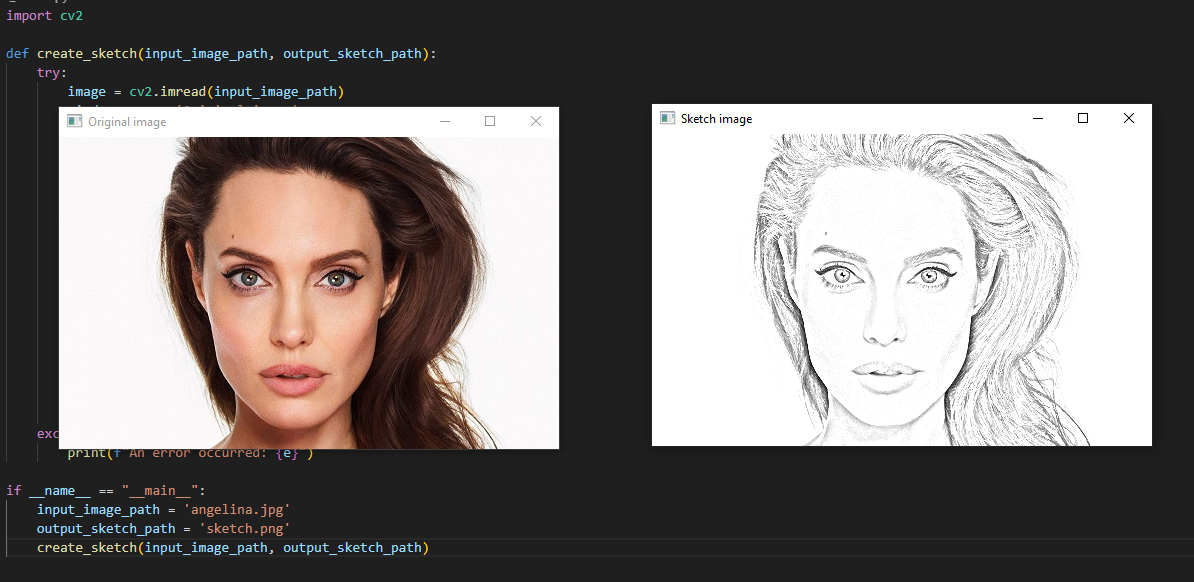
In this tutorial I will show you how to convert image to pencil sketch in python.
Read the input image and convert it to grayscale image and then invert it. Afterwards apply smoothing. create the sketch
PYTHON CODE:
import cv2

def create_sketch(input_image_path, output_sketch_path):
    try:
        image = cv2.imread(input_image_path)
        window_name = 'Original image'
        cv2.imshow(window_name,image)

        grey_img = cv2.cvtColor(image, cv2.COLOR_BGR2GRAY)
        invert = cv2.bitwise_not(grey_img)

        blur = cv2.GaussianBlur(invert, (21, 21), 0)
        invertedblur = cv2.bitwise_not(blur)

        sketch = cv2.divide(grey_img, invertedblur, scale=256.0)
        cv2.imwrite(output_sketch_path, sketch)

        window_name = 'Sketch image'
        cv2.imshow(window_name, sketch)

        cv2.waitKey(0)
        cv2.destroyAllWindows()
    except Exception as e:
        print(f"An error occurred: {e}")

if __name__ == "__main__":
    input_image_path = 'angelina.jpg'
    output_sketch_path = 'sketch.png'
    create_sketch(input_image_path, output_sketch_path)